Manage subscription
Please visit our website for a description of subscription plans and pricing.
PFLB Platform allows you to purchase a subscription and additional VUser minutes directly from the GUI.
If you encounter any limitations of the subscription plan during the testing process, the Upgrade your subscription plan button will appear in the GUI.
Buy subscription
After registering and logging in to PFLB Platform, please review the pricing plans.
Select a subscription and click Choose. To get started, we recommend selecting Kickstart Month.
Click Subscribe.
Enter your credit card details and click Pay. A message is displayed “Payment completed successfully”.
Click OK.
The subscription is available to all users of your team. For more information about teams, see Create teams and manage users.
Kickstart Month
Kickstart Month is a one-month subscription that includes expert support for launching testing and a money-back guarantee. The subscription is provided once for each company.
To get support for launching testing, follow these steps:
After paying for your subscription, click Book a Kickstart call.
Select a convenient day and time for the call. The call with the expert lasts 30 minutes.
Click Next.
Enter your name and Email. If needed, you may also invite colleagues and add a comment for the meeting.
Click Schedule event. You will receive an invitation to the meeting via email.
To get the guarantee, follow these steps:
Book onboarding and contact support.
Import a JMX or HAR file into the test.
Set up a load profile.
Run your test within 30 days of purchasing your subscription.
If you do not achieve the desired test result, request a full refund.
If you subscribe within 7 days after onboarding, we convert your $299 into VUh/AI credits. Any unused Kickstart VUh carry over for 60 days after your subscription starts.
View subscription
To view information about the current plan and the number of remaining VUser-minutes, in the upper-right corner of the window, click user name  . The user profile opens:
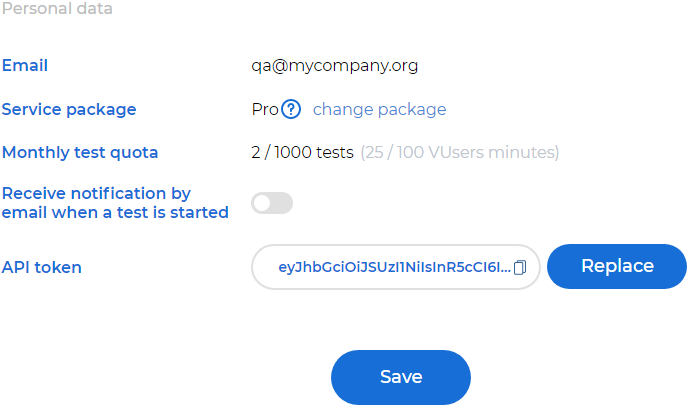
An user profile contains information:
Email.
API token. For more information, see Generate an API token.
Date Format. Date and time display format.
VUser minutes available. The number of VUser-minutes equals total working time of all virtual users during testing. 1 VUser-minute represents 1 virtual user that works for 1 minute. Each month the amount of the prepaid VUser minutes are recovered. The unspent VUser minutes aren’t transferable to the next month. If needed, you can buy additional VUser-minutes.
Monthly subscription. The current subscription plan.
Subscribe to a new plan
To subscribe to a new plan, follow these steps:
In the upper-right corner of the window, click user name
.Click the link in the Monthly subscription field.
Select a subscription. Description of subscription plans and prices is available on our website.
Note
If you switch to a more expensive plan while your subscription is active, the cost will be recalculated based on how long you used the cheaper plan.
Click Subscribe.
Enter your credit card details and click Pay. A message is displayed “Payment completed successfully”.
Click OK.
The subscription is available to all users of your team. For more information about teams, see Create teams and manage users.
Purchase of additional VUser minutes
Additional VUser minutes purchased willn’t expire after a month. They remain available until you use them.
Note
When testing, the VUser minutes available under the subscription are used first, and then the additional VUser minutes are used.
To purchase additional VUser minutes, follow these steps:
In the upper-right corner of the window, click user name
.In the Buy extra 300 000 VUser minutes area, click Top up.
Enter your credit card details and click Pay.
You and all of the users on your team will have access to an additional 300,000 VUser minutes.